Update Working Load End Time
Overview
The Working Loads page gives the ability to record the end time for a load that was worked.
Prerequisites
Before you can Update the Start and End Times for a Working Load you must:
- Access the Working Loads page.
- Assign a Load to be Worked
- Update Working Load Start Time
Process
To Update the Time for When a Load Finished Being Worked:
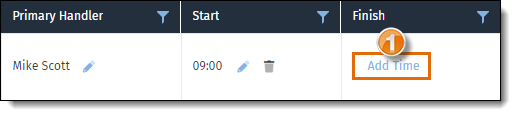
- Click Add Time to add the time the load started being worked.
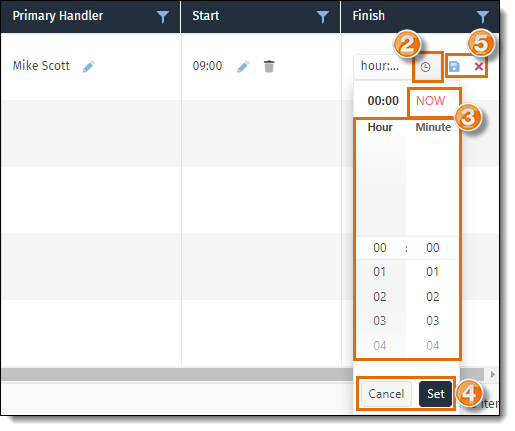
- Click the Clock icon to open the time selector.
- Select the Start Time or click NOW to enter the current time.
- Click Set to continue with the entered time, or Cancel to cancel and close the menu.
- Click the Save icon to save the selected time, or the Cancel icon to cancel the changes.
Result
The load end time has been updated, the name of the handler and load start and end times are removed from the grid on the Working Loads tab, and the trailer number appears on the Location Utilization tab as an empty trailer ready to be assigned to another load or dispatched to the carrier.
Related Topics
Now that you know more about updating the end time for a working load, you may want to read about how to: