Update Working Load Start Time
Overview
The Working Loads page gives the ability to record the start time for a load being worked.
Prerequisites
Before you can Update the Start Time for a Working Load you must:
- Access the Working Loads page.
- Assign a Load to be Worked
Process
To Update the Time for When a Load Started Being Worked:
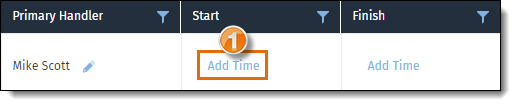
- Click Add Time to add the time the load started being worked.
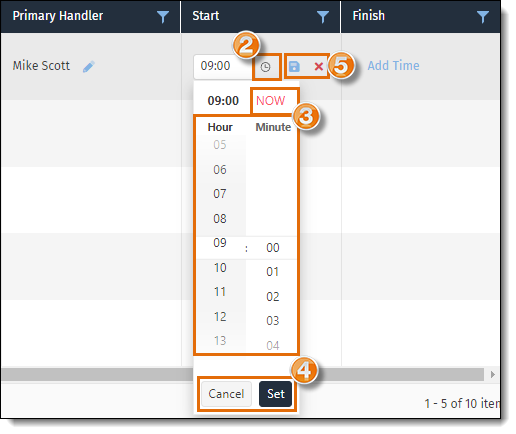
- Click the Clock icon to open the time selector.
- Select the Start Time or click NOW to enter the current time.
- Click Set to continue with the entered time, or Cancel to cancel and close the menu.
- Click the Save icon to save the selected time, or Cancel icon to cancel the changes.
Result
The load start time has been updated.
Next Steps
Now that you have updated the start time for a working load, you may need to update the working load end time: