Search for a Shipment with Missing Documents
Overview
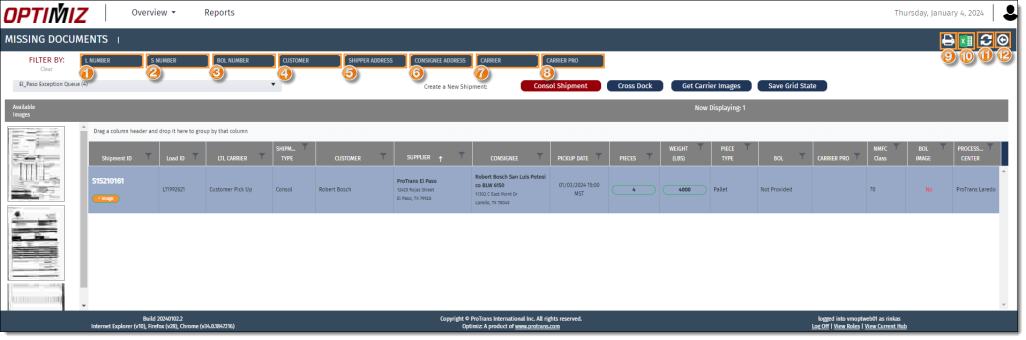
Users can find shipments that are missing documents based on a variety of criteria. Information that can be used to perform a shipment search includes:
- Load Number
- Shipment number
- BOL number
- Customer
- Shipper address
- Consignee address
- Carrier
- Carrier Pro #.
Users can enter as many criteria as needed. Users can add documents to the shipments in the search results grid.
When Should I search for a shipment with missing documents?
You should search for a shipment that is missing documents when you have the documents available to assign to the shipment.
Prerequisites
Before you can search for shipments, you must access the Missing Documents tile. See Access Missing Documents.
Process
To Search for a Shipment that is missing documents:
- Enter the Load Number.
- Enter the Shipment Number.
- Enter the BOL Number.
- Enter the Customer.
- Enter the Shipper Address.
- Enter the Consignee Address.
- Enter the Carrier.
- Enter the Carrier Pro #.
- Click Print to print the search if necessary.
- Click Excel to export the search to an Excel spreadsheet if necessary.
- Click Refresh to refresh the grid and search if necessary.
- Click Back to return to the My Dock screen.
Result
Optimiz finds all matching results and displays them in the data grid.
Now that you know more about searching for a shipment with missing documents, you may want to read more about: