Add or Edit In Bond Information
Overview
When Should I Add In Bond Information?
Add In Bond information to any shipments that are scheduled to be imported across the border into the United States.
Prerequisites
- The In Bond number must be available.
Process
To Add In Bond Information:
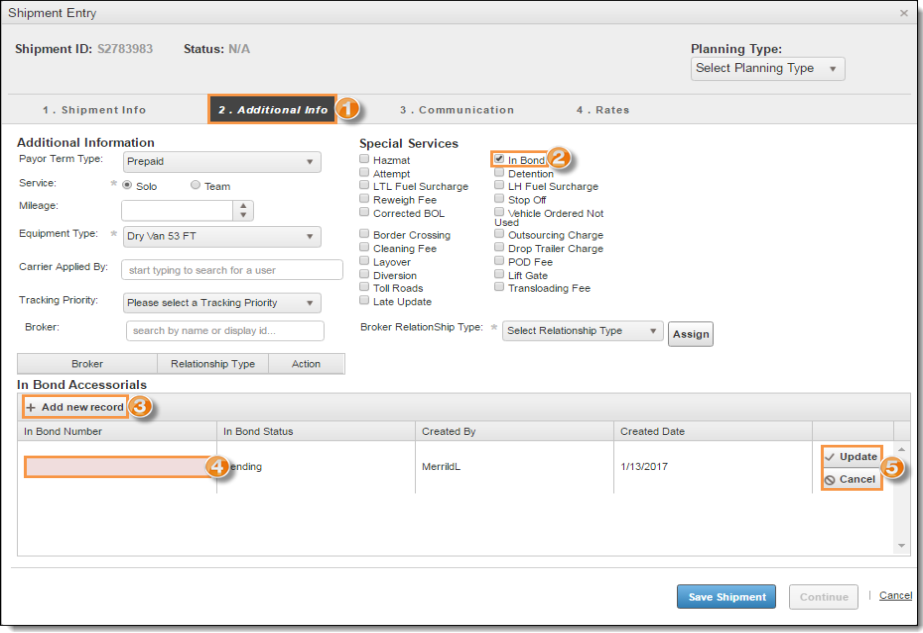
- Access the Additional Info tab when adding or editing a shipment. See Add a Shipment to a Logistics Plan for details.
- Select In Bond to open the In Bond Accessorials pane.
- Click + Add New Record.
- Enter the In Bond Number. The remaining fields are read-only and will be filled by Optimiz.
- Click Update to save the record or Cancel to discard.
To Edit Existing In Bond Information:
- Access the Special Services tab when adding or editing a shipment. See
- Click Edit on the record to be modified.
- Modify the In Bond Number as needed.
- Click Update to update the record or Cancel to discard the changes.
Result
The In Bond record information is saved and the status is set to Pending.