Cancel a Load
Objective
Users will be able to cancel loads.
Overview
The ability to cancel a load depends on a variety of factors. A load may need to be cancelled if it was entered by mistake or if a customer requests it. If unsure whether or not to cancel a load, ask your supervisor. A load may be cancelled as long as the final check call has not been entered and it is not on an invoice. By cancelling an incorrect load or cancelling a load due to customer request, accuracy is maintained within the system and unnecessary tracking efforts are reduced.
A load may only be cancelled by user roles of Accounting Manager, Admin, Analysis/Engineering, FM Account Representative, FM Manager, Management, and Planning Manager.
Prerequisites
- Only loads for which a tender has not been sent or for which a tender has been accepted can be canceled. Loads for which a tender has been sent and not accepted must first have their tender canceled.
- A load cannot be canceled if it is on an invoice. Only Accounting users can remove loads from invoices.
Process
To Cancel A Load:
- Search for the load to be cancelled. See Search for Active Loads for details.
- Click Cancel.
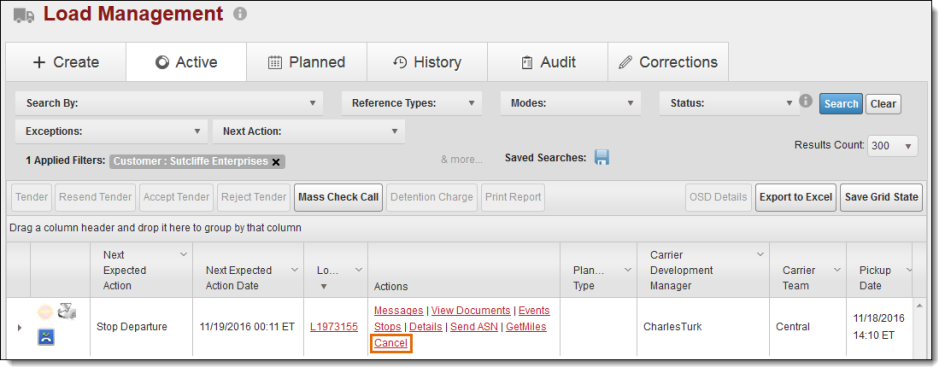
The Cancel Reason dialog box opens.
- Select a reason for cancelling from the dropdown list.
- Add an Internal Comment to the load if needed. A message is required for a cancellation reason of Other.
- To send the customer an email notification when the cancellation is processed, enter their email address in the Customer Email(s) field, and click the + icon.
- Email addresses added will show below the Customer Email(s) box. Click the X to remove an email address from the list. Repeat step 5 to add more email addresses to the email notification.
- Click Cancel Load.
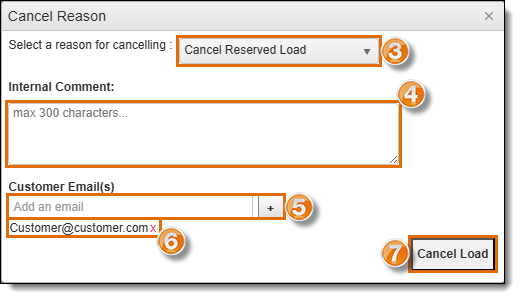
A confirmation dialogue box opens.
- Click Yes to cancel the load or No to stop the cancellation.

Result
The load's status is changed to Cancelled, and the load is moved to Load History. If a reason of Vehicle Ordered Not Used was selected, the Vehicle Ordered Not Used process will begin. See Process Vehicle Ordered Not Used Load for details.