Add Reference Documents to a Load

Overview
Carriers can use the Optimiz Carrier Portal to add shipping documents, such as bills of lading or proofs of delivery, to their loads.
When Should I add reference documents to a load?
Add reference documents if the load has not yet been closed in order to fulfill a customer document requirement or to keep all relevant load information together in the Optimiz database.
Example:
Sutcliffe Enterprises requires their carrier, Eldritch Transit, to upload all proofs of delivery into Optimiz for easy retrieval. Neil, the dispatcher at Eldritch Transit, uses the Optimiz Carrier Portal to attach PODs submitted by his drivers to loads when he is completing the final check call.
Prerequisites
Before you can attach reference documents to a load, you must:
- Accept the tender for the load. Documents can only be attached to accepted loads.
Process
To add reference documents to a load:
- Search for the load to be updated. See Performing Searches for details.
- Hover the mouse over Shipping Documents.
- Click View Documents.
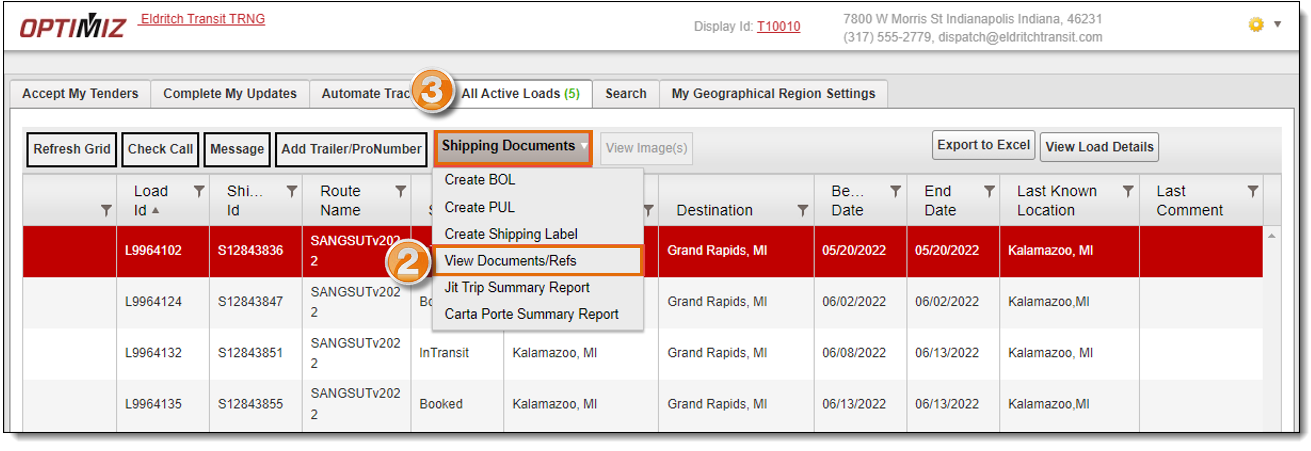
- Select the Reference Type of the document to be added.
- Enter the Reference Type Value of the document to be added.
- Click Choose Files and select the document to be added from your computer.
- Click +Add.

Result
The selected documents are added to the load. They can be viewed by ProTrans, the carrier, and the customer.