Review Reference Notes
Overview
Load specific references are available as reference notes that can be accessed within the search grid. If multiple references of the same type (such as more than one BOL number) exist, they can be accessed by a Documents link. Examples of reference notes include:
- Bill of Lading
- Customer Reference ID
- Sales Order Number
- Carrier Pro
- Purchase Order
Prerequisites
Before you can review reference notes, you must:
- Log in to the Customer Portal. See Log In to the Customer Portal.
Process
To Review Reference Notes:
- Search for the load or shipment. See Search for Loads or Shipments for details.
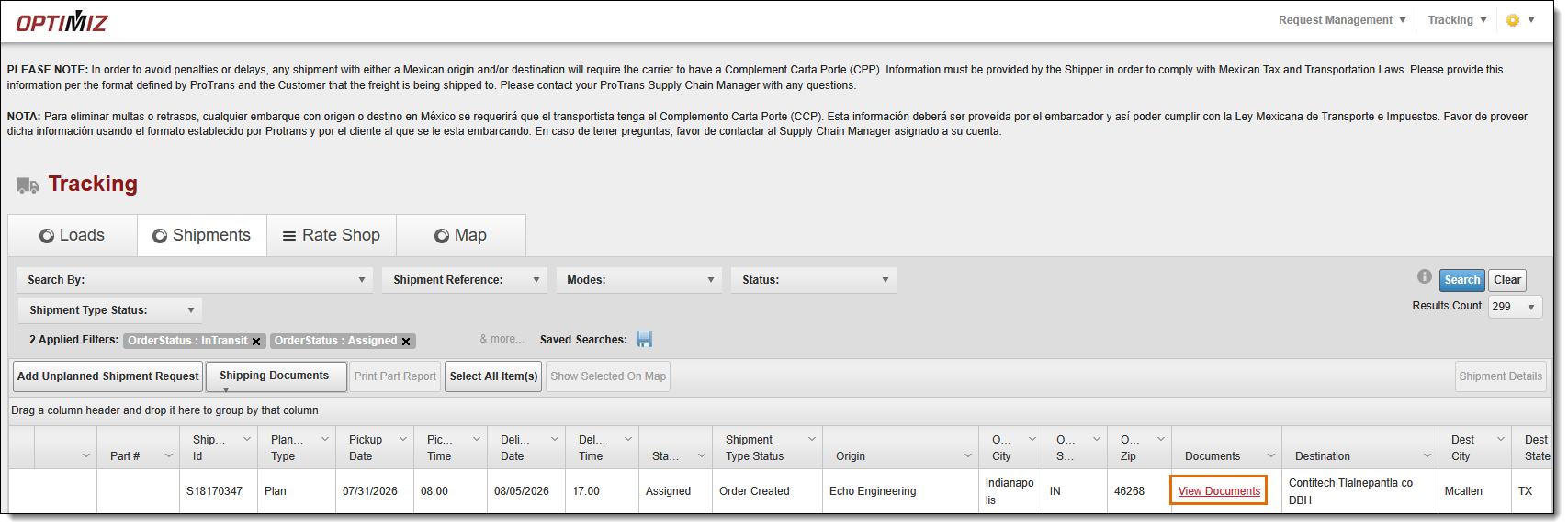
- Click the View Documents link in the Documents column.
The references are available for review in the View Images/Refs pop-up window.
- To view an attachment for an existing reference, click View Attachment. The attachment will open in a new window with options to download or print it.
- To edit an attachment for an existing reference, click Edit Attachment.
- To view more details about a specific reference, click View Detail.
- To add an attachment to an existing reference, click Add Attachment, and follow the prompts to upload an attachment from your computer.

Result
References are available for review.
Now that you know more about reviewing reference notes, you may want to read more about: