Create Load Documents
Overview
| Document | Description |
|---|---|
| ProBill | Acts as a proof of delivery of a load. Is given to the driver at the time of pickup, taken to the next destination, and signed by the receiving party. |
| Route Sheet | Manifest for linehaul trailers. Includes trailer number, load authorization number, carrier, details for each stop. |
| Linehaul Manifest | Separates shipments by stop. Includes invoice number, load number and barcode, as well as detailed information about each shipment (shipment ID number, pickup date, due date, BOL, origin, destination, quantity, and weight). |
| Delivery Manifest | Contains the same basic information as the Linehaul Manifest, but also includes a consignee signature block by shipment for receiver to note overages, shortages, and damages. |
| Part Report | Contains all the part information on the load. |
| Consolidated Trip (BMW) | A manifest specific to BMW. Compiles all information on all loads shipping to BMW facilities in one document. May also be referred to as a Bordero. |
| Consolidated Trip (Del Note) | Identical to the Consolidated Trip (BMW) report except that it is sorted by Delivery Note. |
| Consolidated Trip + PULs (BMW) | Contains both the Consolidated Trip report PUL documents for each shipment is assigned to the load. Any PUL that is printed more than 24 hours prior to shipment will have a watermark denoting it as a draft. |
| Consolidated Trip + PULs (Del Note) | Identical to the Consolidated Trip + PULs (BMW) report except that it is sorted by Delivery Note. Any PUL that is printed more than 24 hours prior to shipment will have a watermark denoting it as a draft. |
Prerequisites
Before you can print a load document, you must:
- Access Dock Planning. See Access Dock Planning.
- Search for a Load. See Search for Active Loads.
Process
To Print a Load Document:
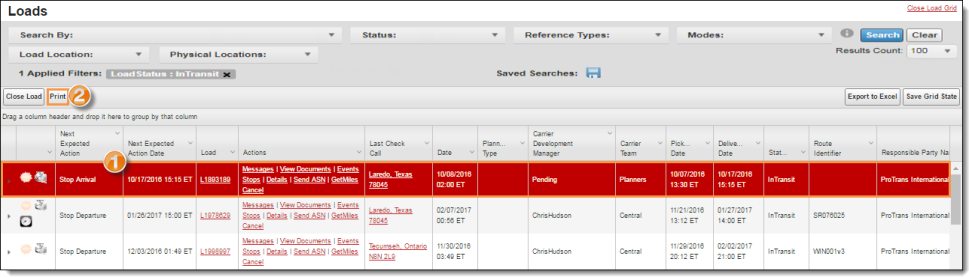
- Select the load.
- Click Print.
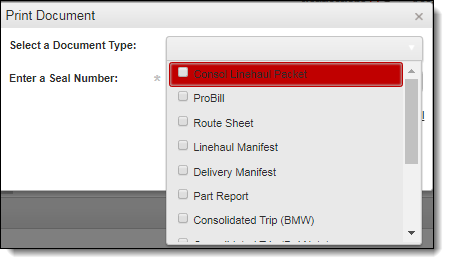
- Click on the Select a Document Type dropdown arrow and select the document type from the menu.
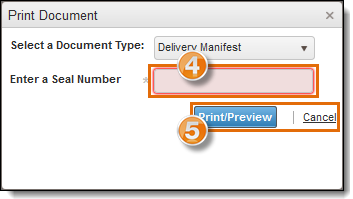
- All documents except the route sheet require a trailer seal number. If necessary, enter the Serial Numberof the trailer seal.
- Click Print/Preview to print the document or Cancel to exit without printing.
The document opens in a new window.
- Click the print icon.

- Follow the browser specific prompts to finish printing.
Result
The selected document is printed.