Print a Delivery Manifest from Inbound Working Loads
User will be able to print Shipping Documents.
Overview
Various shipping documents can be accessed through the Inbound Working Loads tile. Documents available include:
- ProBill
- Linehaul Manifest
- Delivery Manifest
- Route Sheet
Process
To Print Shipping Documents:
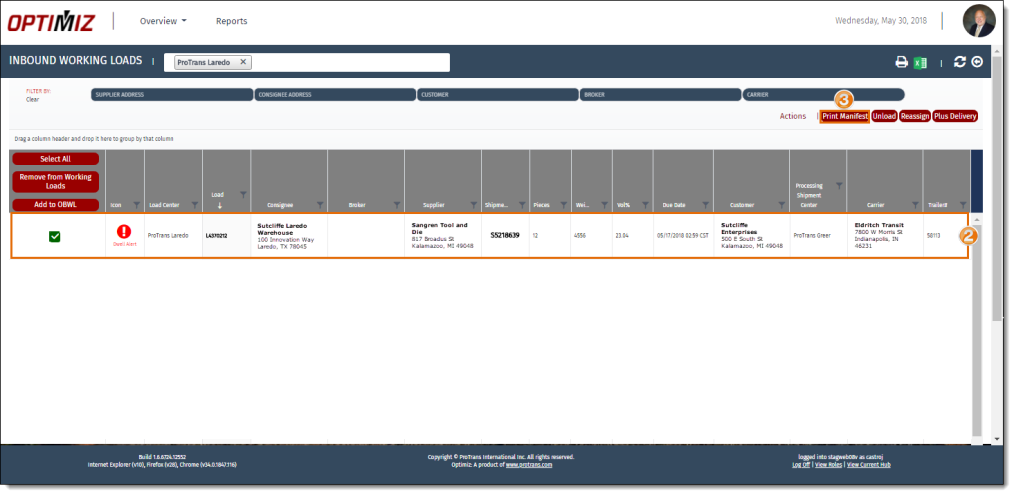
- Access the Inbound Working Loads tile. See Access Inbound Working Loads for details.
- Search and select a load from the results grid.
- Click Print Manifest.
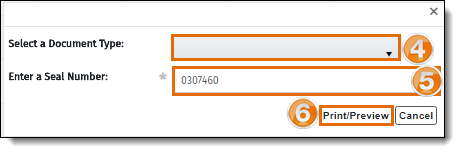
- Select a Document Type from the dropdown menu.
- Enter the Seal Number of the trailer seal, if necessary.
- Click Print/Preview to print the document.
The document opens in a new window.
- Click the print icon.

- Follow the browser specific prompts to finish printing
Result
The selected document is printed.